How to customize your stock research dashboard
Customize a stock research dashboard around the question your thesis asks. In Quantery, open a company from a scan, select Customize, add the metrics you expect to inspect repeatedly, move the useful cards forward, and remove the rest. Select Done when the layout fits your process. Your saved layout persists while the active thesis still brings its own features into view.
That last detail keeps the dashboard useful across different kinds of research. Your layout is the stable reading desk. The thesis supplies the working papers for the current job. When you switch from Piotroski F-Score to Graham Net-Net, you shouldn't have to rebuild the page or remember which calculated values drove the result.
What should a stock research dashboard answer?
A dashboard earns its space when it shortens a repeated investigation. Start with a sentence:
When this company passes my thesis, I want to see whether the score, cash generation, and balance-sheet value are moving together.
That sentence tells you what belongs near the top. It also tells you what doesn't. A metric can be interesting and still be irrelevant to this thesis. Filling every available slot produces a longer page without producing a clearer question.
Begin from the survivors table. Its rows compare companies at a scan date, which makes it the right place to choose a company whose result deserves inspection. Open a row and the company page changes the unit of analysis. You're now looking at how that company's evidence developed across filings and scans.
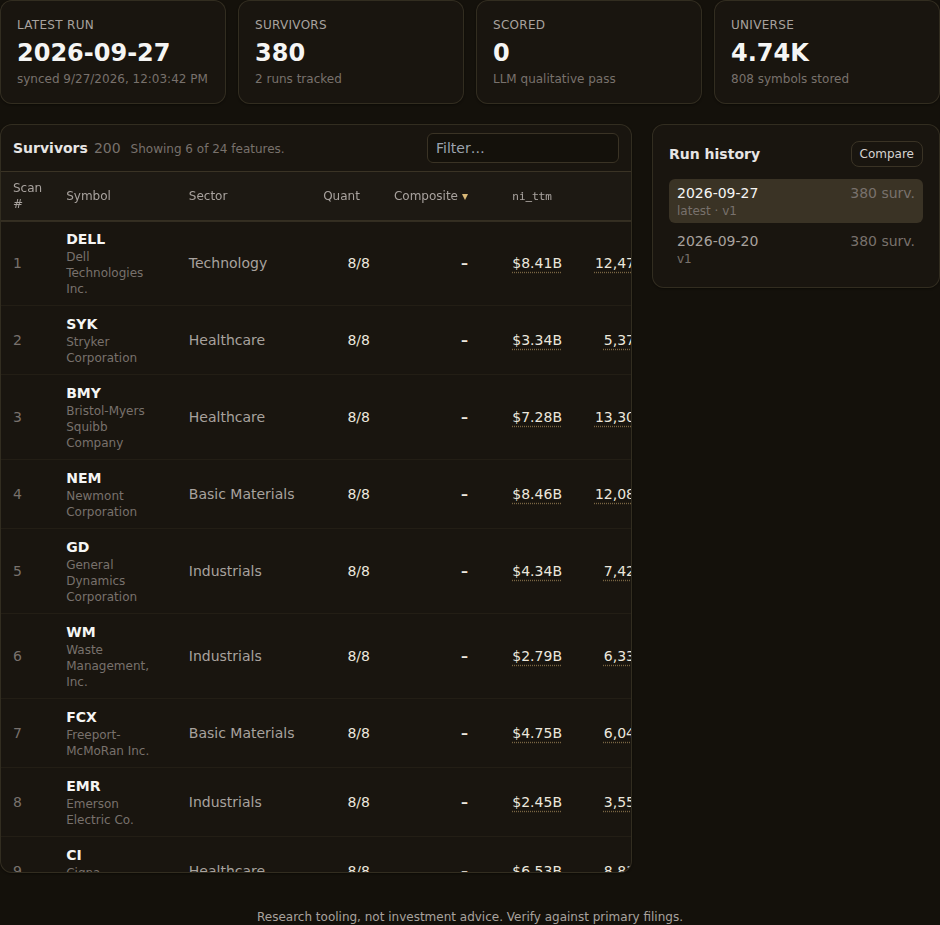
If the row itself is surprising, use the stock screen result audit before changing the layout. Trace the gate and matched rule first. Customization helps you revisit a relationship; it can't tell you whether the original calculation used the field you intended.
Build a stable default before chasing the current thesis
The company dashboard begins with score history, quarterly free cash flow, and quarterly tangible book value per share. That's a useful generic spine for value research. The score shows how repeated runs classified the company. Free cash flow shows the cash left after capital spending. Tangible book value per share gives a balance-sheet measure after intangible assets are removed.
Those defaults aren't sacred. Select Customize, then use + Add metric… to choose from the data available for that company. Move a card earlier when you expect to consult it on most reviews. Remove a card when it keeps making you scroll past evidence that matters more. The score history stays on the dashboard, though you can move it.
Treat the saved layout as your default research habit, not as a restatement of one thesis. A useful default might keep free cash flow near the top because several of your theses ask whether accounting earnings turn into cash. The free cash flow guide explains why that history deserves attention and where its limits sit.
Tangible book value per share may deserve the same treatment if you often study asset-backed value. If your work is mostly capital-light businesses, it may deserve less prominence. The point is repetition. Put the fields you repeatedly use to challenge a result where you'll see them without hunting.
The layout is saved on your local installation. Returning to another company uses the same default arrangement, so the page becomes familiar through use. That consistency is valuable when the numbers change. You spend less attention locating a card and more attention reading what moved.
Thesis features should appear without changing your default
An active thesis can use features that aren't part of your saved dashboard. Quantery adds those thesis features to the company page for the current view, marks them as thesis-related, and leaves your permanent layout unchanged.
Suppose your default keeps cash flow and tangible book value visible. Open a result from Greenblatt Magic Formula and the page also needs the operating earnings yield, return on capital, and combined rank that shaped that result. Open a Graham Net-Net result and the relevant asset-floor and cash-burn features differ. Those calculated values arrive with the thesis context.
This separation prevents a subtle form of dashboard clutter. If every thesis feature became a saved preference, trying several templates would leave a permanent trail of unrelated cards. Keeping thesis features temporary means the company page can explain the current result while your default still reflects the way you work across results.
It also prevents a worse mistake: assuming the same metric matters equally under every thesis. A return-on-capital card carries direct weight in Greenblatt Magic Formula. Under a balance-sheet liquidation thesis, it may be background context. The number hasn't changed meaning, but its role in the argument has.
You can inspect how the bundled templates frame those different questions in the guide to choosing a stock screen template. Use that distinction when you decide which cards belong in the stable layout and which should arrive from the active thesis.
Read filing history and scan history as different evidence
A chart on the company page can come from two clocks. Mixing them will give you a story the data never told.
Filing history follows fiscal periods stored from company reports. A quarterly cash-flow series belongs to this clock. Its horizontal axis describes the business's reported periods, and the observations can change only when another filing arrives or stored filing data is refreshed.
Scan history follows recorded thesis runs. A calculated feature may appear once per run because the value was captured when that thesis evaluated the company. The series can reflect a newer filing, a changed price, or another market-dependent input. It can also reflect a different thesis version if you changed the rules between runs.
The two clocks sometimes line up and sometimes don't. A weekly scan can repeat the same filing-based input several times. A price-sensitive yield can move between those scans even though the filing numerator is unchanged. A filing can arrive between runs and move several features at once.
Read the card title and horizontal labels before reading the slope. If the chart follows fiscal periods, ask what changed in the reported business. If it follows scans, ask what changed in the full evaluation context. Use two-run comparison when you need to locate added names, dropped names, or feature movement between recorded runs.
A line also needs enough history to be a line. When the app has only a current value, the dashboard shows a value card. When no usable value exists, it says so instead of drawing an empty chart. Treat that state as missing history, with no trend to interpret.
Add metrics in families, then remove the redundant ones
Choose a small family of measures that tests one relationship. For cash-backed quality, that might mean reported earnings, operating cash flow, and free cash flow. For balance-sheet value, it might mean tangible book value per share alongside the market-dependent valuation feature used by the thesis.
Then look for duplication. Two cards can carry different names while describing much of the same economic fact. Free cash flow and operating cash flow overlap heavily when capital spending is modest. Return on equity and return on capital can both reward profitable businesses while treating leverage differently. Seeing both can sharpen an investigation, but giving both equal prominence can make one outcome feel like two independent confirmations.
The dashboard makes the relationship visible enough for you to challenge it, while the judgment remains yours. If removing a card leaves your research question unchanged, the card was probably decoration. If removing it destroys an important cross-check, restore it and write down what the comparison is meant to catch.
This is the visual counterpart to avoiding duplicate signals in a thesis. A crowded dashboard doesn't change the score, but it can still distort your reading by repeating favorable evidence until it feels stronger than it is.
A repeatable company-review workflow
Use the same sequence until it becomes boring (boring is useful here):
- Start from a recorded scan and open a company whose result needs explanation.
- Read the gate and criterion path before studying the charts.
- Check that the active thesis's calculated features appear on the company page.
- Read each chart's clock: filing periods or scan runs.
- Add a metric only when it answers a question you'll ask again.
- Move recurring cross-checks forward and remove cards that don't affect the diagnosis.
- Open the data and filing evidence when a value, date, or gap looks wrong.
Don't edit the thesis just because the dashboard surfaced an awkward history. First decide whether the rule is wrong, the proxy is weak, or the local data is incomplete. If coverage is the issue, refresh the specific dataset the thesis uses and rerun the unchanged thesis before drawing a conclusion.
A good company dashboard keeps the right disagreements in view: score against source metrics, cash against earnings, the latest run against prior runs. You'll still have to explain the result. Arrange those disagreements around the thesis you're testing. Then change the layout as your research habits improve. The page is yours, just like the rules.
Research tooling, not investment advice. Nothing here is a recommendation to buy, sell, or hold any security. Screens, scores, and backtests are informational only; backtested results are hypothetical, exclude costs such as commissions and slippage, and do not guarantee future results. Verify against primary filings and make your own decisions.
Want to try this on your own rules? Quantery is free for 14 days: the full app, no card required.
← All articles