How to create a stock screen report
To create a stock screen report in Quantery, open the recorded scan you want to explain, choose Print report, check the run context, decide which companies need detail, and review the preview before saving or printing it. The useful work happens before export. A polished document can't repair a run whose scope, rules, or evidence you haven't checked.
Build the report around the question the scan answered. Keep the thesis version and run settings visible, include near-misses only when they help explain the boundary, and give company detail to the names the reader will actually inspect. If you turn on the optional AI memo, read it against the recorded values before the document leaves your desk.
Start with the exact recorded run
A report summarizes the run you're viewing. That sounds obvious until a thesis has several stored runs and its active rules have changed since the result was recorded.
Open the thesis and select the relevant entry from Run history. Check the run date, thesis version, universe scope, gate, and settings. If you meant to report an older result, stay on that result. Back to latest takes you back to the newest run, which may answer a different question because prices, filings, settings, or rules have changed.
This is why a report should begin with a recorded run. A saved watchlist is a reusable launch recipe, while a completed scan is the result produced by one execution of that recipe. The report belongs to the result.
The same distinction applies to thesis revisions. Quantery keeps completed scans tied to their recorded thesis identity, while the active thesis can continue to evolve. If you've changed a threshold or formula, version and roll back the thesis deliberately instead of letting the current rules blur into an earlier result.
Once the right run is on screen, choose Print report beside the survivor results. The report opens as a preview. Nothing has gone to a printer yet. The button starts your review; it doesn't end the job.
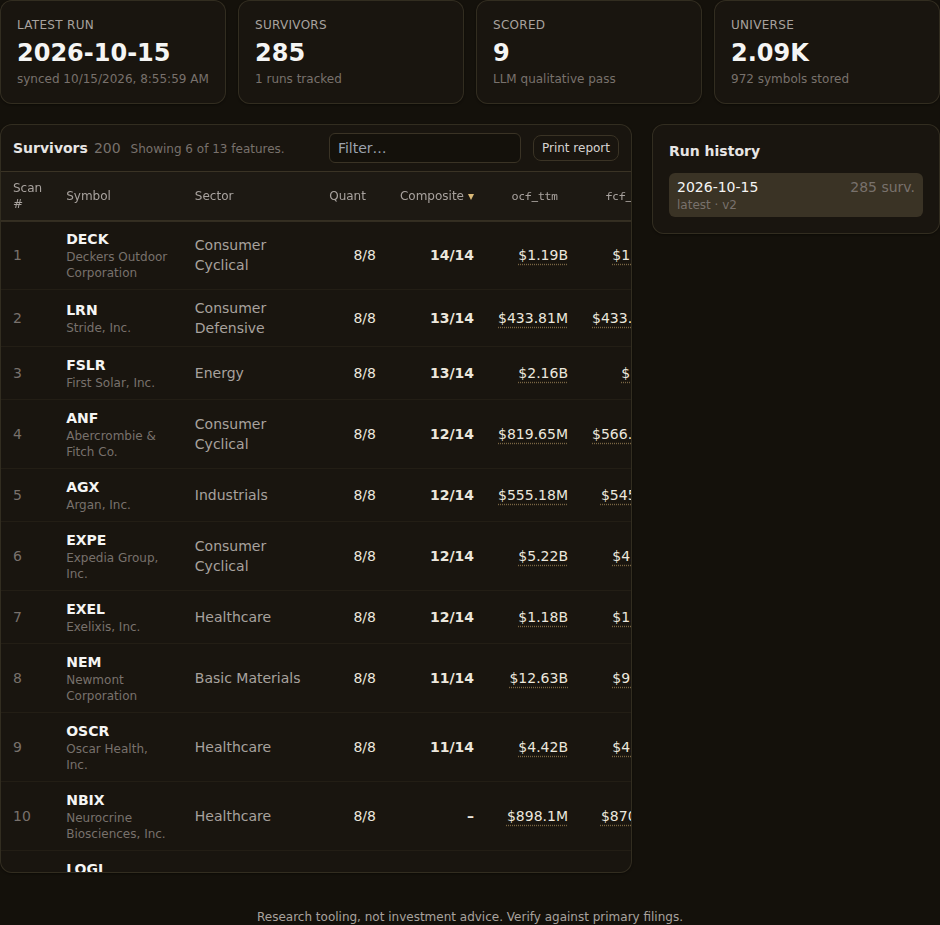
Check what the report says the scan covered
Read the summary at the top before reading any company card. It should let another person reconstruct the question that produced the list:
- Which thesis and recorded run is this?
- Did the scan cover the thesis universe or a selected set of symbols?
- Which gate decided whether a row passed?
- Which run settings changed the evaluation?
- What do the sector and verdict mixes say about the resulting set?
Scope is easy to understate. A report from a custom universe doesn't make a claim about every listed company. A symbol-limited run doesn't even make a claim about the whole custom universe. Write a short note beside the exported file if the intended population isn't obvious from the report itself.
Then read the printed criteria. Quantery fills the thesis parameters into the criterion expressions, which is more useful than showing a friendly label alone. “Cash generation” could mean several equations. A criterion with its actual boundary tells the reader what the engine evaluated.
Pay attention to the gate as well. A strict gate requires every criterion to earn credit. A score gate admits a row when its combined score reaches the chosen threshold. The same company scores can lead to different membership under those rules. If the distinction still feels slippery, strict gates and score gates answer different screening questions.
This check catches a surprisingly ordinary mistake: producing a clean report from the wrong setup. The PDF may be internally consistent while answering a question nobody meant to ask. Confirm the question first.
Include near-misses when the boundary matters
Leave Near-misses off when the reader only needs the passing set. Turn it on when the report needs to explain how the gate separated similar rows, why a familiar company disappeared, or whether one criterion created a brittle cutoff.
A near-miss is a retained result that failed the final gate. It doesn't necessarily sit just below a threshold. Under a strict gate, one zero-scoring criterion can block a row whose other scores look strong. Under a score gate, a company can earn partial credit across the board and still finish below the required total. Missing or stale required data can also stop a row from passing.
That makes near-misses useful evidence, but poor decoration. Appending them without a question gives the reader a longer document and an ambiguous second list. Include them when you expect to discuss the boundary, then say what kind of failure matters. The fuller near-miss diagnostic workflow separates low totals, strict-gate blockers, and data-quality failures.
Don't change the thesis just to make the report look less awkward. If near-misses expose a threshold worth testing, revise the rule as a new version and run the comparison. The awkward boundary may be the most useful finding in the document.
Choose company detail for the next conversation
The ranked survivor table is the index. Company detail cards are where the report becomes inspectable. They carry the features, criterion scores, flags, and qualitative material retained with each result.
Use Company detail to match the document to its job. A quick research meeting may need cards for the names likely to be discussed. An archival review may need broader coverage. Selecting every company by reflex can bury the evidence in pages nobody reads, while selecting too few can leave a challenged row without its supporting detail.
Choose the set before generating an AI memo. The memo covers the companies selected for detail, so changing that set changes the evidence it has to summarize. If you expand the selection afterward, use Regenerate before relying on the memo.
The compact ranked table and the cards serve different purposes. Use the table to see ordering and compare a concise set of features. Use a card when you need all retained feature values and the score breakdown for one company. A rank alone doesn't explain why a row passed.
When a number looks surprising, leave the report and audit it in the app. The report preserves the recorded feature value from the scan. A current explanation can use newer lake data after another filing arrives. The result-audit workflow keeps recorded and live values separate, then traces the current calculation to its filing inputs. A portable report summarizes the recorded result. It can't recover every source row used on the run date.
Treat the AI memo as an editing draft
AI executive summary is optional and starts off. When enabled, it asks the configured provider to summarize the recorded report material for the selected company-detail set. Review the output as you would review a draft from a colleague who has seen the cards but hasn't opened the filings.
First compare its broad claims with the sector mix, verdict mix, scores, and flags. If it says the set shares a strength, confirm that the relevant feature appears across the set, including beyond the few names you remember. If it calls out a concern, find the recorded value that supports the concern. Delete the memo from your workflow if you can't connect its claims to the evidence in front of you.
Second, read each company assessment beside its card. The memo can compress repeated patterns and point out tensions between criteria. It can't establish facts beyond the stored material, recover missing provenance, or decide whether a thesis is economically sensible. For qualitative work that consults external sources during the scan, audit the model, prompt, notes, and cited sources as part of the research procedure.
The toggle is also a data-sharing decision. Nothing is sent for this feature until you enable it. Once enabled, the recorded material needed for the memo goes to the provider you've configured. If the research can't leave the machine, keep the toggle off and write the summary yourself.
Review the preview before saving
Read the report from top to bottom once. You're looking for mismatches more than typos:
- Does the title identify the thesis and recorded run you intended?
- Does the scope match the claim you'll make about the results?
- Are the gate and filled-in criteria the rules you meant to apply?
- Are near-misses present for a reason the reader will understand?
- Does every discussed company have enough detail to inspect?
- Does the memo stay within the recorded evidence?
Then use Save PDF in the desktop app or Print for the system print dialog. Give the exported file a date and keep it with the thesis version or research note that explains why the run was made. The PDF records what you handed over. Your note should record the question, unresolved data issues, and the next test.
A report can faithfully summarize an incomplete run. If required fields were missing, the universe was narrower than intended, or a data refresh hadn't finished, good formatting won't make the coverage complete. Check those conditions before circulation and write down any limitation that changes how the list should be read.
The point of the report isn't to freeze the thesis forever. It's to make one pass through your rules legible enough that someone else can challenge it. Preserve the run, show the boundary, carry the relevant evidence, and record what you'll change next. The rules remain yours to inspect and adapt.
Research tooling, not investment advice. Nothing here is a recommendation to buy, sell, or hold any security. Screens, scores, and backtests are informational only; backtested results are hypothetical, exclude costs such as commissions and slippage, and do not guarantee future results. Verify against primary filings and make your own decisions.
Want to try this on your own rules? Quantery is free for 14 days: the full app, no card required.
← All articles