How to reuse stock screen formulas
To reuse a stock screen formula in Quantery, save the calculation or threshold as a favorite in the visual thesis builder. A feature is a named calculation used in a thesis, such as trailing free cash flow divided by market cap. A parameter is a named threshold, such as $cash_conversion_floor. Open another thesis, insert it with From favorites, and the builder adds an editable copy. Changes to that copy won't alter the saved favorite or the thesis it came from.
For a common calculation you haven't built yet, begin with From library. The library supplies ready-made formulas for familiar values such as earnings yield, cash conversion, margins, leverage, and trading liquidity. Favorites are where your own definitions live. Both routes save typing, but the more useful benefit is consistency: the same named calculation can start each experiment before you decide how that thesis should judge it.
What should you reuse across stock theses?
A feature is a named value calculated for each company. fcf_yield, for example, can divide trailing free cash flow by market capitalization. A parameter is a named number that a rule refers to, such as $cash_conversion_floor. Features hold arithmetic. Parameters expose the dials you'll want to change and retest.
Those are good units of reuse because they answer narrow questions. How will this thesis define net cash? Which value will represent cash conversion? What market-cap floor should be easy to tune? Once you've settled those definitions, rebuilding them by hand invites small differences that are hard to spot later.
A criterion carries more of the thesis's judgment. It decides how much credit a feature earns. A gate goes further and decides whether a company stays in the result at all. Quantery favorites cover features and parameters, so inserting a favorite doesn't smuggle an old verdict into a new thesis. You still have to decide what the copied calculation means in its new setting.
That boundary matters. The same cash-conversion feature might support an earnings-quality criterion in one thesis and serve as a required gate in another. Reuse the calculation. Reconsider the claim.
Start with the built-in formula library
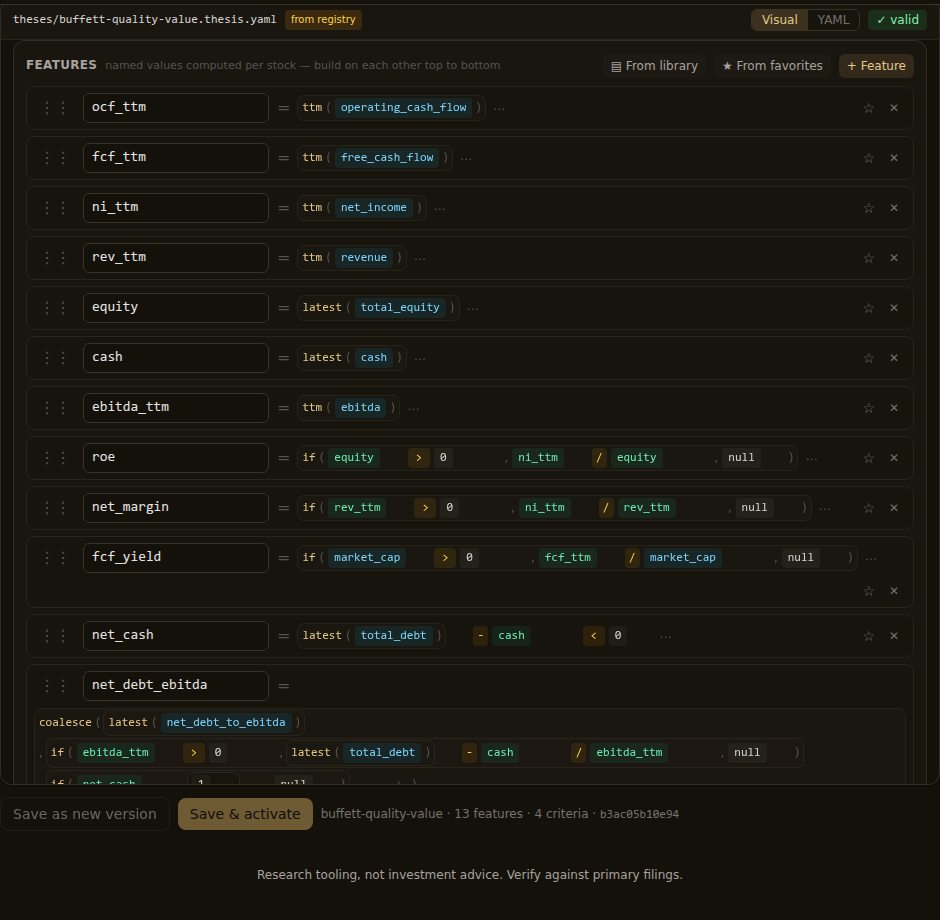
Open a thesis in the visual builder and find the Features card. From library opens the built-in collection. The entries are grouped by the job they do, including valuation, growth, profitability, cash flow, balance-sheet strength, debt, dilution, price risk, and quality. Pick an entry and Quantery inserts it as an ordinary feature row.
The library entry is an independent copy. You can rename it or change its expression without modifying the library. If its suggested name already exists in the thesis, the builder adds a numbered suffix instead of overwriting your feature. Read that new name before you reference it elsewhere. An automatic suffix prevents damage; it can't decide which definition your criterion meant to use.
The library's feature formulas are self-contained. They can use filed fields, market values, and thesis functions, but they don't depend on another feature or parameter that may be absent. That makes them safe starting blocks. It doesn't make every formula suitable for every business. A debt ratio can still misread a bank, and a margin comparison can still mix unlike industries. Choosing a template starts with the business question, and the same rule applies to a library formula.
The Params card has its own From library control for common thresholds. Treat those values as initial settings. A threshold only becomes defensible when it matches the economic claim you're testing and survives nearby alternatives. The guide to setting stock screen thresholds explains why round starting values and boundary tests beat a cutoff chosen from the prettiest past result.
Turn your own formula into a favorite
Suppose you keep defining cash conversion the same way. Build the feature once, give it a durable name, and inspect the expression. Then use the star on that feature row. The saved favorite becomes available from From favorites in every thesis.
Do the same with a parameter when the name itself is useful across projects. A parameter called cash_conversion_floor says more than threshold_3, even if each thesis later gives it a different value. Good names reduce the chance that a copied rule points at the wrong dial.
The shape below is illustrative, and the bundled templates remain the reference for exact thesis fields. The threshold is a proposed research setting, not a claim about what works:
params:
  cash_conversion_floor: 0.8

features:
  cash_conversion: if(ttm(net_income) > 0, ttm(free_cash_flow) / ttm(net_income), null)

criteria:
  cash_backing:
    rules:
      - { when: "is_null(cash_conversion)", score: 0 }
      - { when: "cash_conversion >= $cash_conversion_floor", score: 1 }
      - { else: 0 }
The feature asks how much free cash flow backs each dollar of positive net income. Its denominator guard matters. Without that guard, a loss-making company can produce a ratio whose sign looks mathematically valid while the economic interpretation has broken. Free cash flow and reported earnings can diverge for several reasons, so the formula gives you a prompt for investigation. It doesn't settle the investigation.
Saving the feature as a favorite stores the expression shown in its row. Saving the parameter stores its current value. It doesn't save the criterion around them, the research note that justified the threshold, or the evidence that would make you reject the idea. Keep those with the thesis and its run history.
Insert a favorite without importing a hidden dependency
Open the target thesis, use From favorites on the matching card, and choose the saved item. The inserted row belongs to that thesis from then on. Delete the favorite and the copy remains. Edit the copy and other theses don't move.
This copy behavior protects reproducibility. A shared live formula would let a cleanup in one place rewrite old research everywhere. Quantery avoids that. The tradeoff is drift: several theses can begin with the same favorite and then evolve into different definitions. That may be exactly what you want, but the shared name can hide the split.
Before saving the target thesis, compare the copied expression with the source definition you intended to reuse. If you've changed it, rename it or note the difference. Then save the thesis as a new immutable version so completed runs keep their exact rules.
Custom favorites need one more check. Unlike the built-in library, a favorite can refer to another feature or to a parameter. Saving fcf_yield_rank = pct_rank(fcf_yield) doesn't bundle fcf_yield with it. A fresh thesis that lacks the underlying feature now has an unresolved name. The builder lets you insert the favorite because you may intend to add the dependency next; thesis validation is where the missing reference appears.
You can handle that in either direction:
- Make a frequently reused feature self-contained when repeating the underlying formula keeps it readable.
- Save its dependencies as separate favorites, insert them first, and keep their names stable.
- If the component needs a web of supporting features, start from a copied thesis or template instead of treating one row as portable.
Don't dismiss a validation error by replacing the missing name with whatever looks close. Open the source thesis and inspect what that name calculated. net_income_ttm and operating_income_ttm may both be earnings measures, but swapping them changes the economic level of the formula.
How do you check that the reused formula still means the same thing?
First, read the expression aloud. “Trailing free cash flow divided by market cap, when market cap is positive” is a better check than recognizing the label fcf_yield. Labels survive copy and paste more easily than meanings do.
Next, inspect its period logic. A point-in-time balance-sheet value and a trailing flow answer different timing questions. A same-quarter comparison isn't interchangeable with an adjacent-period change. The guide to trailing and forward numbers is the useful refresher when ttm(), latest(), or lag() appears in a favorite.
Then validate the thesis and run it. A successful validation establishes that the schema and expression compile. It can't establish that the formula belongs in this universe or deserves its weight. Open a result and audit the feature back to its filing inputs. If the value surprises you, check the periods and null handling before moving the threshold to make the row pass.
Finally, ask whether the new thesis has given the reused feature duplicate votes. Cash conversion and an accruals check can reward related evidence. Return on equity and net margin can respond to the same profit change. The arithmetic can be correct while the score overstates how many independent claims it contains. Remove overlapping signals and rerun before treating a longer scorecard as a stronger one.
A favorite is a maintained definition
Use the library when you need a standard starting calculation. Use a favorite when you've made a definition you expect to use again. In both cases, inspect the inserted row as if someone else wrote it. The few seconds saved on typing aren't worth much. The durable payoff is having the same visible formula available across experiments, with each thesis free to change its own copy.
Reuse should make your method easier to inspect without freezing it. Save the arithmetic that has earned a stable name. Insert it, validate it, trace one result, and change it when the new thesis demands a different definition. The rules stay reusable because they also stay yours.
Research tooling, not investment advice. Nothing here is a recommendation to buy, sell, or hold any security. Screens, scores, and backtests are informational only; backtested results are hypothetical, exclude costs such as commissions and slippage, and do not guarantee future results. Verify against primary filings and make your own decisions.
Want to try this on your own rules? Quantery is free for 14 days: the full app, no card required.
← All articles